CrmLeaf
Professional Services Automation Software for Service Businesses
Overview
CrmLeaf is a PSA (Professional Services Automation) platform for businesses that sell their time and expertise: consulting firms, digital and creative agencies, IT and software service teams, and other service businesses that deliver client projects. Instead of running sales in one tool, projects in another, timesheets in a spreadsheet and invoices in an accounting app, CrmLeaf keeps the whole service lifecycle in a single database, from the first lead and proposal to the final invoice and the support ticket that follows.
Key Features
Unified CRM and proposals Track leads, contacts and companies in one CRM, manage your sales pipeline and send professional quotes and proposals. When a deal is won, the client and scope carry straight over into delivery, so sales and delivery teams always work from the same information.
Project management Plan projects with tasks, milestones and owners, follow progress in one place and keep clients and internal teams aligned. Every project is tied to its client, budget and billing setup from the start, which makes it easy to see where work stands and what is still to be delivered.
One-click time tracking Team members can log time against the right client, project and task in a click. Timesheets are captured as work happens instead of being reconstructed at the end of the week, which improves accuracy and reduces lost billable hours.
Resource planning and capacity See who is available, who is overloaded and which skills are free before you commit to new work. Resource planning helps managers balance workloads, staff projects with the right people and avoid burnout while keeping utilization healthy.
Billing and invoicing Turn approved time and milestones into invoices without manual re-entry. CrmLeaf supports the billing models service businesses actually use, including time and materials, milestone billing, recurring retainers and one-off invoices. Payments can be collected through integrations such as Stripe, PayPal and Razorpay.
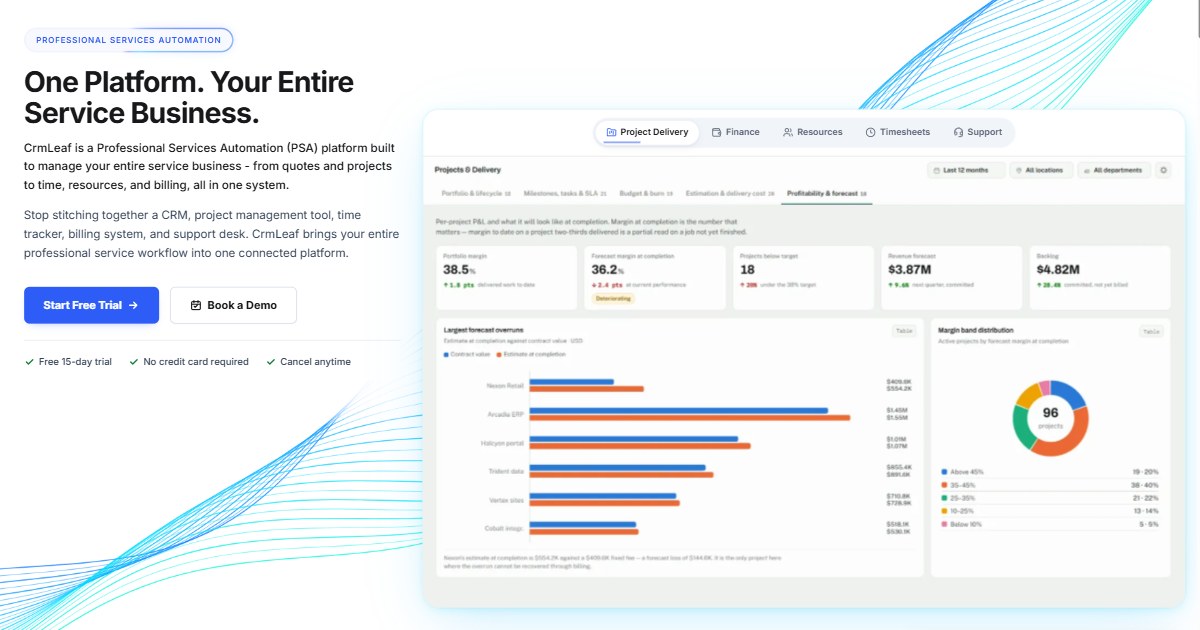
Project profitability dashboards Dashboards show revenue, invoiced amounts, unbilled work, margins and forecasts across projects and clients. Leaders can spot at-risk projects early and make decisions based on live numbers rather than month-end spreadsheets.
Support desk Handle client requests and support tickets in the same platform, linked to the client record and project history, so the team has full context when responding.
Built-in AI assistant CrmLeaf includes Ask AI and AI writing tools that help draft status updates, client emails and other content, saving time on routine communication.
MCP server for AI tools CrmLeaf provides an MCP server with 68 tools, so teams can work with their CrmLeaf data from AI assistants such as Claude, ChatGPT, Cursor and VS Code.
Integrations and API Connect CrmLeaf with the tools you already use: QuickBooks, Zapier (5,000+ apps), Slack, Google Calendar, Zoom, DocuSign, WhatsApp, Stripe, PayPal, Razorpay, Calendly, Google Drive and OneDrive. A REST API and webhooks are available for custom workflows.
Mobile apps CrmLeaf is available on the web and as native apps for iOS and Android, so teams can track time, check projects and stay on top of clients from anywhere.
Use Cases
Consulting firms use CrmLeaf to manage the full engagement lifecycle, from proposal to delivery and billing, while keeping consultant utilization and project margins visible.
Digital and creative agencies use it to run multiple client projects at once, track billable hours accurately, manage retainers and avoid scope creep eating into profit.
IT and software service companies use CrmLeaf to plan resources across projects, log time against client work and invoice on time and materials or milestone terms.
Growing service businesses that have outgrown spreadsheets use it to replace a patchwork of separate CRM, project, timesheet and invoicing tools with one connected platform.
Pricing & Plans
CrmLeaf offers a free plan so small teams can get started at no cost. Paid plans start from $9 per user per month, and new accounts can try the full product with a 15-day free trial. You can upgrade, downgrade or cancel at any time. Visit crmleaf.app/pricing for current plan details.